
How to share RSVP updates with your couples without constantly preparing new reports

What if you could keep your couples up to date with their guests' RSVPs without having to manually prepare and send weekly reports?
You could improve the experience you offer them while spending less time on one of the most repetitive aspects of RSVP management.
In this article, I'll show you how to give your couples access to real-time RSVP updates without handing over responsibility for managing their guests.
But before we get started, let me say one thing: if using technology means investing more time, changing the way you work and compromising on the personalisation of your service, you might as well do everything manually.
You shouldn't have to adapt to technology. Technology should adapt to you. And I'm about to show you how.
Let's get started!
The problem isn't how often your couples ask for updates
“How many guests have confirmed?”
“Have our friends travelling from abroad replied yet?”
“Has Auntie Maria included her children or not?”
You can probably answer the first two questions. By the third, you're already thinking, “How on earth am I supposed to know who Auntie Maria is?”
But in reality, these are all perfectly reasonable questions. Having access to these details helps your couples feel involved, informed and reassured throughout the wedding planning journey.
Yet every time you receive one of these requests (almost always followed by “It would be great if you could let us know quite soon”), you pull out your superpowers and, somewhere amongst the thousand urgent things on your to-do list, find the time to prepare another report and share it with your couple.
SPOILER: it took longer than expected, your couple immediately came back with more questions, more guests replied in the meantime, and the cycle starts all over again.
Same request. Two completely different experiences.
Now imagine it's Sunday evening.
Your couple are chatting about their wedding and want to know how many guests have confirmed.
In one scenario, they message you, wait for your reply, and you have to find the time to check and share the information.
In the other, they log into a platform and check the latest responses themselves.
They get the information exactly when they need it.
You carry on enjoying your evening.
And the following day, you can get back to work, focusing on the information you still need to move forward with the wedding planning.
Here's the point: what if, instead of making yourself constantly available, you made the information available instead?
How to share RSVP responses with your couples using Invytly
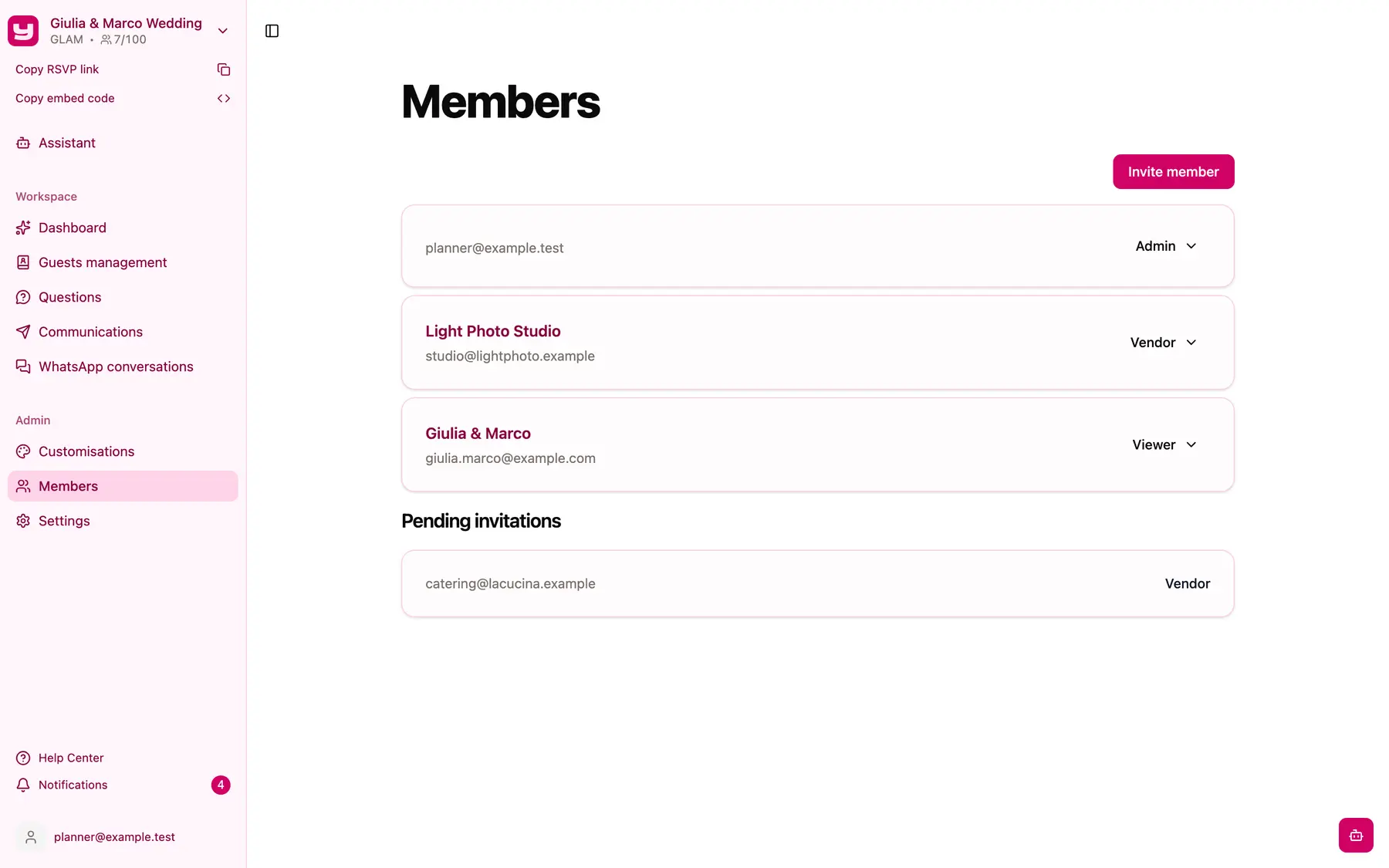 With Invytly, you can invite your couples to access their wedding project directly by assigning them the Viewer role.
This role is designed to allow your couples to keep track of their guests' responses independently, while you continue to manage the guest list.
Every time a guest completes the RSVP form, their answers appear in the project dashboard and can be viewed in real time.
There's no need to maintain a separate document to share with your couple or prepare a new report every time more guests respond.
You and your couple can access the same up-to-date information.
What information can your couples access?
With the Viewer role, your couples can:
- View summaries of RSVP responses
- View each individual guest's answers
- Download responses in Excel format
Depending on the questions you've included in your RSVP form, they'll also be able to view information about plus-ones, children, dietary requirements and any other preferences you've collected.
All without having to ask you for another update.
Does giving your couples more autonomy mean losing control of guest management?
You might be wondering what happens if your couple accidentally edits a response, removes a guest or changes the RSVP form.
That's exactly why Invytly offers different roles and permissions.
With the Viewer role, your couples cannot:
- Edit guest information
- Access the guest management section
- Edit the RSVP form questions
- Send communications to guests
- Change the project settings
They can only view the dashboard, consult the responses and download them.
You continue to manage the RSVPs, while your couples can keep track of their guests' responses.
You can find out more about roles and permissions in the official Invytly guide.
Giving your couples the freedom to access information doesn't mean handing over responsibility for managing it.
It means offering greater transparency while keeping guest management as part of your professional service.
The value of technology lies in what you no longer have to do
When choosing a technology tool for your work, rather than just asking what features it offers, try asking yourself another question:
“What will I no longer have to do myself?”
Your expertise is essential when advising your couples, finding solutions to unexpected situations and guiding them towards suppliers that suit their budget.
Constantly sharing the latest guest numbers, on the other hand? Absolutely not!
And that's exactly what we believe technology should do for you.
Give you back the time to focus on planning and on the couple who chose you for your expertise in guiding them through the process of bringing their dream wedding to life.
Your job is to plan weddings, not keep up with technology. That's our job. Follow us on Instagram for practical technology tips every week, designed to make your life easier without changing the way you work.